


Handy Art Reference Tool
4.7383.00 Reviews
App Specs
- Version
- 5.1.2
- Updated On
- License
- $2.99
- Downloads
- 50,000+
- Developer
- Belief Engine
- Categories
- Comics
- Platform
- Android, iOS
Screenshots

 Analysis by AppCompare
I often reach for a hand reference when a drawing starts to feel stiff, but searching through photos can interrupt the work and still leave me without the angle I need. Handy Art Reference Tool is aimed at that very gap: it gives artists a way to study a pose from different viewpoints rather than relying only on a fixed picture. I find that idea most useful for quick practice, sketching on the move, and checking shapes before committing to a more finished piece.
A reference that can be shared without sharing an account
On a household tablet, an art reference app can serve more than one person. One person might be working through hand poses while another uses a figure as a guide for a character sketch. The benefit is the adjustable viewpoint: each artist can look for the angle that helps with their own drawing, instead of taking turns searching for separate photographs.
That shared-device convenience has a boundary, though. I would treat the app as a tool one person opens for a drawing session, not as a shared project space. If several people use the same device, it helps to agree on a simple routine: finish with the reference in a neutral state, and let the next person choose a model and pose for themselves. That avoids confusion over whose setup is on screen without assuming the app includes household profiles or collaboration tools.
What to expect before settling in
The app costs $2.99, with in-app purchases priced at $1.99 per item. I’d think of the initial price as buying access to a focused drawing aid, then consider any optional purchase only if it answers a specific need in your own practice. It is not the same proposition as a free image search, where you can browse many kinds of subjects, but it may save time when the particular problem is viewing a pose from another direction.
Belief Engine has maintained this comics-category app since its release on March 27, 2012; the current version is 5.1.2 and it requires Android 6.0 or later. It has a 4.7 average from around 4,500 ratings, with more than 50,000 installs. Those figures suggest that it has found a real audience, but I would still judge it by whether an adjustable reference fits your way of drawing. The Teen age rating is worth keeping in mind in a home where a device is shared, especially when a younger artist uses it alongside adults.
For a shared device, I’d also make the purchase decision with the actual device owner in mind. A paid app is a different commitment from opening a free reference site, and an in-app purchase is something to consider deliberately rather than assume every household user will want. If several people draw on one tablet, a short conversation about who makes purchases and when is more useful than expecting the app to manage that boundary for you.
Exploring the Features
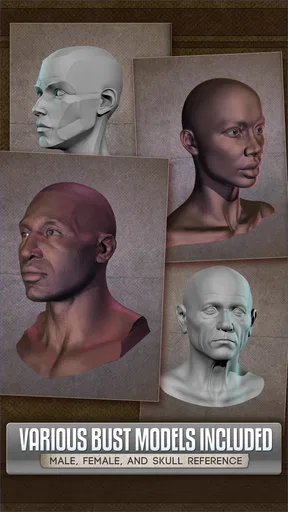
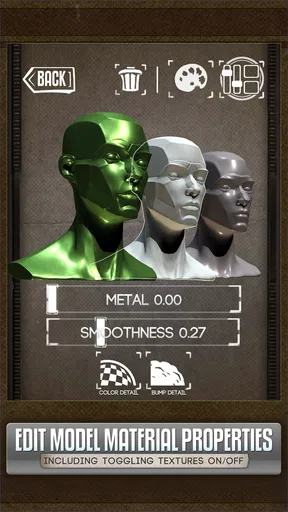
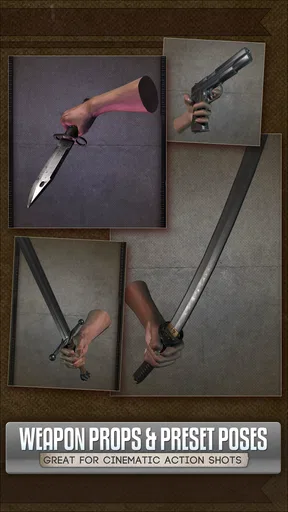
First off, let's talk about what the Handy Art Reference Tool brings to the table. This app is designed for artists who need quick and versatile reference images. The main feature here is the collection of 3D models. You can adjust these models to find the perfect pose, angle, and lighting for your work. It’s like having a virtual model that’s ready to strike a pose whenever you need.
Worth Reading Before You Choose

Flipboard Shows What News Apps Must Do Beyond the Feed

Switching to Android Auto Means Rethinking Your Driving Routine

Google Calendar Makes a Crowded Week Easier to Manage

Ludo King Makes the Most of the Minutes Between Plans

Baby Panda World Brings Quick Play to Modern Phones, but Its Game Library Feels Busy

ESPN’s Live Game View Makes Following Close Games Easier
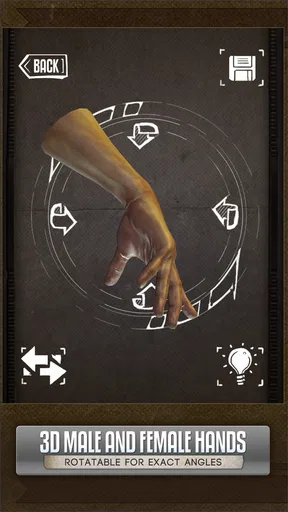
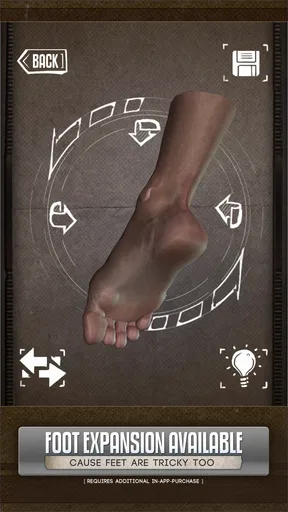
What really caught my attention is the range of models available. You’ve got everything from human figures to hands and even skulls. Each model can be rotated and zoomed in on, allowing for a level of detail that you just can't get from a flat image. Imagine being able to examine a hand at any angle, noticing the nuances of muscle and bone structure. It feels like a game-changer, especially for those tricky perspectives.
Making a reference useful to more than one artist
The ability to change the view is especially helpful when two people are drawing the same broad subject for different reasons. A beginner might need to understand the overall silhouette of a hand, while someone more experienced may be checking how the fingers overlap from a low angle. Rather than treating one pose as a finished answer, I use the model as a way to ask narrower questions: where does the thumb disappear, which planes catch the light, and how does the wrist connect to the palm?
That distinction matters because a 3D reference is a study aid, not an automatic substitute for observation. I wouldn’t copy every contour mechanically. A model can clarify structure and perspective, but a drawing still benefits from selecting and simplifying the forms that matter. For a household drawing session, this can be a good teaching opportunity: one person can adjust the viewpoint while another explains what they are trying to understand, then each can make a different interpretation on paper.
User-Friendly Experience
Now, let’s chat about usability. I found the app to be incredibly intuitive. The interface is clean and straightforward, making it easy to navigate even if you’re not particularly tech-savvy. You can switch between models and settings with just a few taps. Plus, there’s no need to worry about a steep learning curve; the app is pretty much plug-and-play.
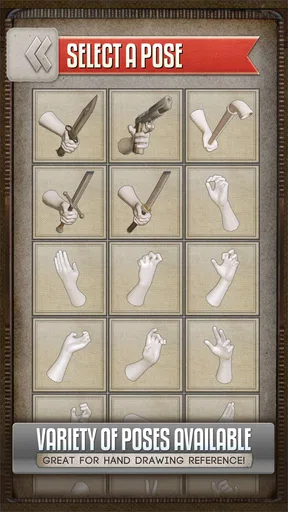
One thing I appreciate is the ability to save your favorite poses. You can build a library of go-to references that you can access anytime. This feature is particularly handy when you're working on a series or a large project and need to maintain consistency in your art.
For a more deliberate workflow, I’d save a pose only after checking it from the angle I actually plan to draw. A favorite that looks good from one direction may not help with the next panel or exercise, so I try to think of saved poses as useful starting points rather than a complete reference library. When several people share the device, naming or organizing saved items in a way everyone understands can also prevent one person’s practice setup from becoming another person’s mystery.
A practical session might look like this: I set up a hand pose, rotate it until the knuckles and palm read clearly, then make a few small studies before changing the light. That order keeps the drawing question simple. If I adjust pose, view, and lighting all at once, it is harder to tell which change helped. This is a small habit, but it makes a reference tool more valuable because it turns casual tapping into focused observation.
Practical Application in Art
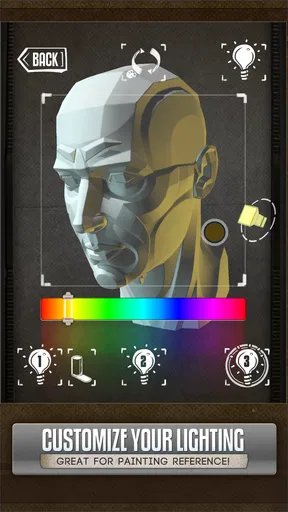
So, how does this app fit into your art routine? Well, I’ve been using it primarily for sketching and digital painting. It’s fantastic for practicing anatomy and improving your understanding of light and shadow. By manipulating the light source within the app, you can study how it affects different surfaces and structures. This kind of practice is invaluable, especially if you’re trying to improve your realism skills.
Another cool aspect is the app’s portability. Whether you’re in a café, at the park, or just lounging on your couch, you can whip out your phone or tablet and start creating. It’s like having a portable art studio in your pocket, which, let’s be honest, is every artist’s dream.
One everyday use I can recommend is keeping it open beside a sketchbook during a short break at home. If a hand in a pose looks awkward, I can check the structure quickly, draw a few variations, and put the device aside again. That is more useful than scrolling through unrelated images when I only need to solve one anatomy problem. On a tablet, the larger view may make it easier to inspect the overall pose; on a phone, portability wins, though small details naturally take more attention.
Compared with the usual alternatives, each tool has a different strength. A photograph gives you a real person, natural irregularities, and details that a model may not capture, but it is fixed to one camera angle and lighting setup. A general image search offers variety, yet finding a suitable pose can take time and the results may not match the drawing problem. A 3D reference is strongest when you need to rotate a subject or control the view; it is less suitable when your goal is to reproduce a specific real-world expression, fabric, or moment.
I would also avoid treating the lighting controls as a shortcut to finished shading. They help me inspect where forms turn and where shadows fall, but a drawing still needs its own visual hierarchy. For a comic panel, for instance, I might use the model to understand a foreshortened hand, then simplify the shadows so the gesture remains readable at the size of the panel. That balance between anatomical checking and clear storytelling is where the app feels most practical to me.
This makes it a strong fit for illustrators, comic artists, and learners who often get stuck on hands, figures, or skull structure and want to test a view quickly. It is less compelling for someone who mainly needs photographic reference, wants broad subject discovery, or prefers to draw entirely from life. If the task depends on fabric folds, facial expression, a particular person, or a precise real-world lighting moment, a photo or live subject will usually be the better reference.
Choosing it for a household art routine
The Teen rating makes the app appropriate to consider for a family device, but an age label is not a substitute for a parent’s judgment about how a young artist uses a device or what else is installed on it. I’d introduce it as a reference tool for drawing and keep expectations clear: it can help someone study a pose, but it does not teach every part of art-making on its own. For a younger artist, working alongside an adult or sharing sketches afterward can turn the adjustable model into a useful prompt for discussing proportion and light.
There is also a coordination trade-off with shared devices. One person may want to leave a pose ready for later, while another needs to use the tablet immediately. Since I wouldn’t assume there are separate household accounts or a built-in handoff system, the simplest approach is to finish a session by noting the model and pose you want to revisit, or by saving a favorite when that is appropriate. That keeps expectations realistic and avoids relying on an account boundary the app may not provide.
For a household deciding whether to buy it, I’d ask one practical question: will at least one person use adjustable 3D references often enough to make them part of a regular drawing habit? If the answer is yes, the focused design can earn its place beside sketchbooks and other art tools. If everyone only needs an occasional picture, free photos or drawing from life may be enough. The app is most worthwhile when the ability to change angle is the specific thing that keeps interrupting the work.
Final Thoughts
In conclusion, the Handy Art Reference Tool is a must-have for any artist looking to enhance their reference library. It combines practicality with creativity, offering a comprehensive solution for artists of all levels. Whether you're a seasoned professional or just starting out, this app provides the resources you need to elevate your art.
If you’ve been on the fence about trying it out, I’d say go for it! With its rich features and user-friendly design, it’s a worthwhile investment for your artistic journey. So, grab your device, download the app, and see how it can transform your creative process. Happy drawing!
Pros
- Extensive library of poses and references.
- User-friendly interface for easy navigation.
- High-quality
- detailed 3D models.
- Offline access for on-the-go use.
- Customizable lighting options.
Cons
- Limited free content without purchase.
- Occasional lag on older devices.
- No option for direct sketching within app.
- Some features require internet connection.
- Limited tutorial guidance for beginners.
FAQs for Handy Art Reference Tool
What is Handy Art Reference Tool used for?
Handy Art Reference Tool is a versatile application designed to assist artists by providing a wide range of visual reference materials. It includes 3D models, anatomy references, and poses that help artists improve their skills in drawing and understanding human anatomy. Whether you're a beginner or a professional artist, this tool can enhance your creative process.
Is Handy Art Reference Tool suitable for beginners?
Absolutely! Handy Art Reference Tool is user-friendly and perfect for artists of all levels. Beginners will find it particularly useful due to its comprehensive library of poses and anatomy guides, which can aid in developing foundational drawing skills. The app's intuitive interface makes it easy for anyone to navigate and learn at their own pace.
Does Handy Art Reference Tool require an internet connection?
Handy Art Reference Tool primarily works offline, which is great for artists who need to use it in areas without internet access. However, certain features, such as downloading additional content or updates, may require an internet connection. This flexibility ensures you can use the app whenever and wherever you need it.
Are there in-app purchases or subscriptions in Handy Art Reference Tool?
Yes, while Handy Art Reference Tool offers a range of free features, there are optional in-app purchases available. These may include additional 3D models or advanced features that enhance your experience. The app does not require a subscription, allowing you to make one-time purchases based on your needs and preferences.
What platforms is Handy Art Reference Tool available on?
Handy Art Reference Tool is available for both Android and iOS devices. It is designed to work seamlessly on smartphones and tablets, ensuring that artists can access their reference materials on the go. Simply visit the Google Play Store or Apple App Store to download and start using the app.


